Click

Showing posts with label HARD DISK. Show all posts

Wednesday, April 6, 2011

Seagate GoFlex Slim 320GB: The World's Thinnest External HDD

As a desktop user I never really jumped on the external storage craze. I kept a couple of terabyte drives in RAID-0 inside my chassis and there's always the multi-TB array in the lab in case I needed more storage. External drives were always neat to look at, but I never really needed any. My notebook's internal storage was always enough.
With the arrival of Sandy Bridge in notebooks however I've given the notebook as a desktop replacement thing a try. I've got enough random hardware if I need a fast gaming machine in a pinch, but for everything else I'm strictly notebook these days. As a result I've come to realize just how precious portable storage is. Most reasonably portable notebooks have one usable 2.5" bay at most (two if you don't mind sacrificing an optical drive). Network storage is great but what if you need something portable on the go with you?
I'm obviously a staunch advocate of spending your internal real estate on an SSD, but if you need the space you've gotta go mechanical for your external storage. If portability is what matters, an external 2.5" hard drive can be quite attractive as they're lightweight and can be powered over USB.
In the 2.5" world there are three predominant thicknesses available: 7mm, 9.5mm and 12.5mm. Most notebook drives are 9.5mm. You'll notice that Intel even ships many of its SSDs with a removable spacer to make them 9.5mm tall in order to maintain physical compatibility with as many notebooks as possible:

That black trim is removable for use in 7mm bays
Thicker drives are needed to accommodate more platters inside, but as platter densities increase so do the capacities of thinner drives. A couple of years ago Seagate announced the world's first 7mm thick 2.5" hard drive and earlier today, it announced the thinnest external 2.5" drive: the GoFlex Slim.
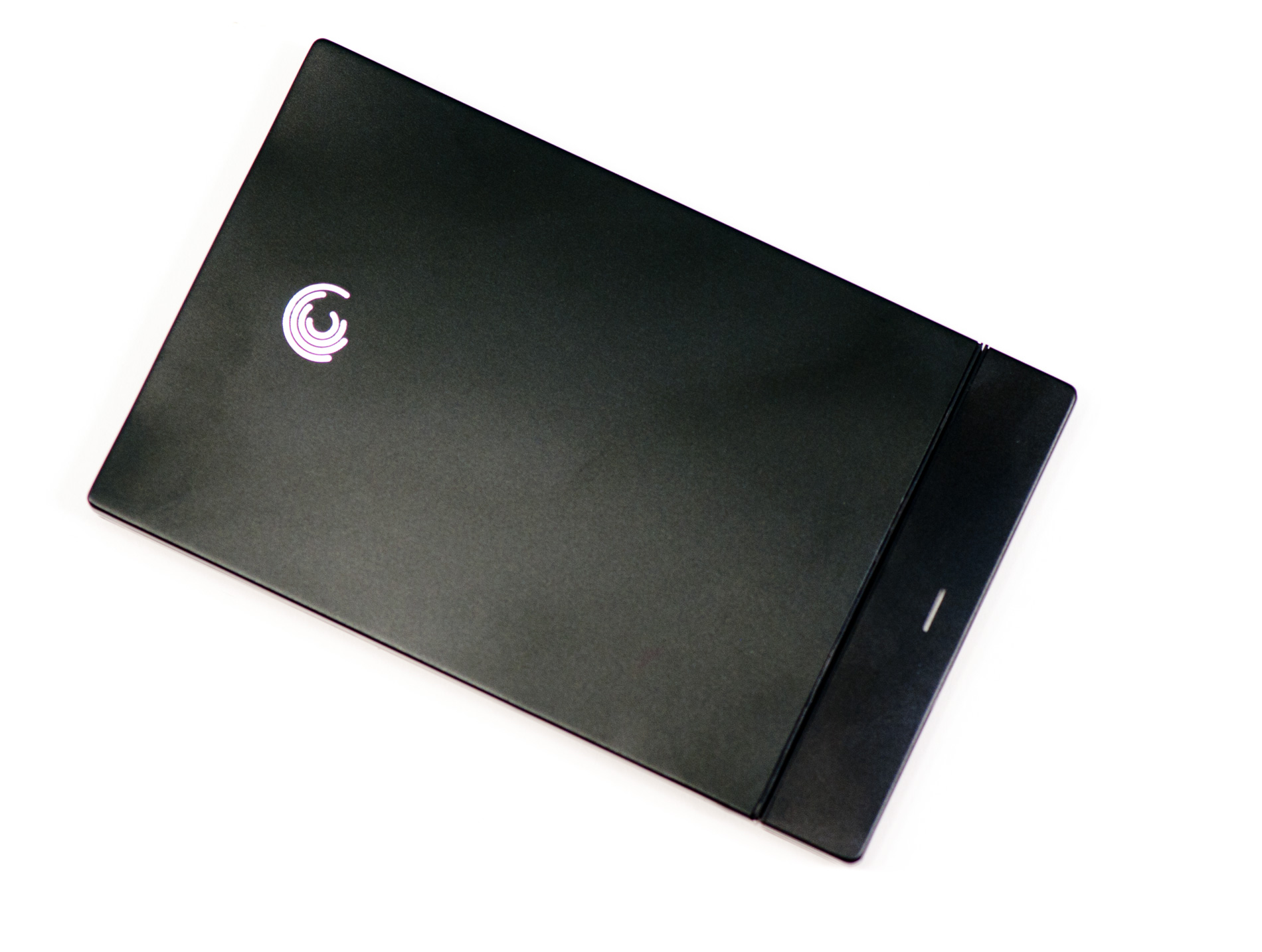
Originally called the GoFlex Thin at CES earlier this year, the GoFlex Slim measures 9mm tall thanks to its internal 7200RPM 7mm SATA drive.
The GoFlex Slim is actually a two-part device. There's the drive itself and a detachable GoFlex USB 3.0 adapter with a white LED power/activity light. The LED is always illuminated by default and lightly throbs when you access the disk. Remove the adapter and you can plug the GoFlex Slim into any other GoFlex compatible device. Seagate has also opened up the GoFlex standard so other manufacturers can build and ship GoFlex compatible devices royalty-free.
The drive chassis is simply glued together. A thin enough tool wedged in between the top cover and the rest of the chassis is good enough to get you inside. Once open you'll notice a pretty simple design:
The GoFlex Slim is nothing more than a 320GB Momentus Thin in a slim plastic case, no different than the other GoFlex drives we've reviewed. The Momentus Thin spins at 7200RPM, has a 16MB on-board cache and is of course a single platter drive.
The drive comes pre-formatted with a single NTFS partition and a copy of Memeo backup software. For the Mac users among us Seagate also includes a Paragon NTFS driver as well as a Mac version of Memeo Backup.
The GoFlex Slim ships with a short 14" USB 3.0 cable that can obviously be used with USB 2.0 ports. The 320GB drive retails for $99.99.
Just as we saw at CES earlier this year, you can expect a HFS+ formatted Mac version to ship with a silver chassis in the not too distant future.

Monday, December 27, 2010

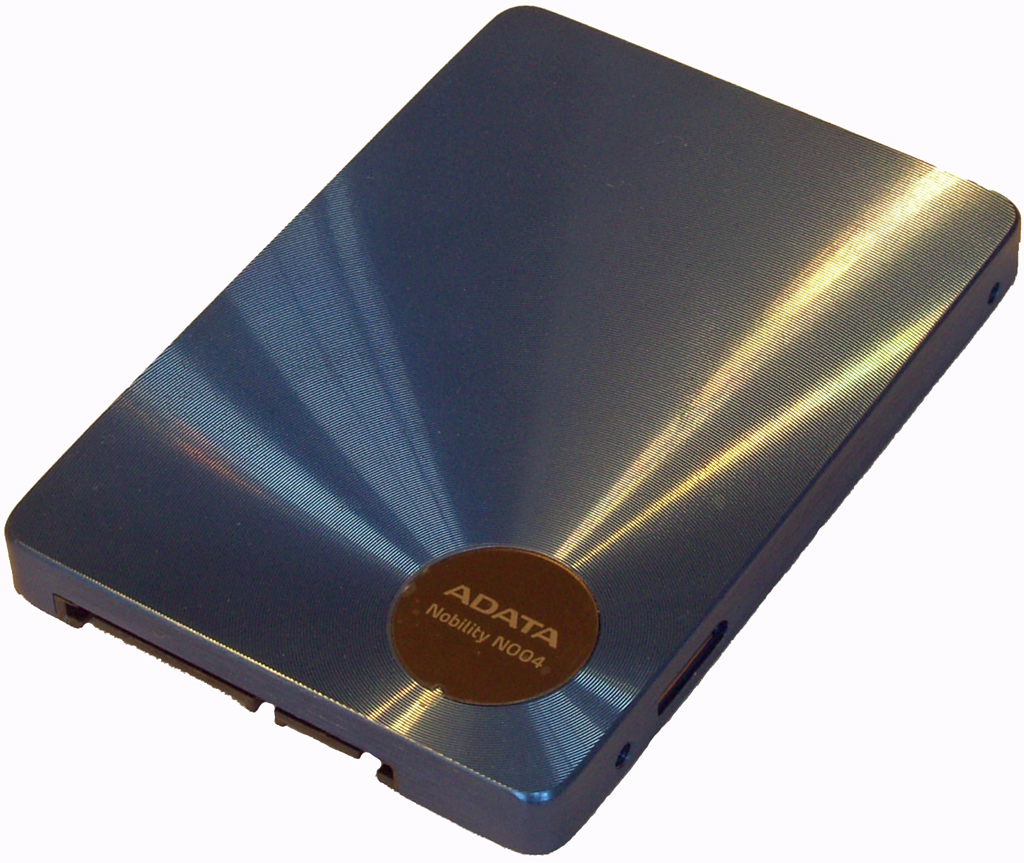
ADATA N004 - SATA & USB 3.0 SSD Reviewed

ADATA’s HDD/SSD storage portfolio is made up of six separate external hard drive series and three internal SSDs. The new N004 series adds three additional USB3/SATA combo SSD drives to the line-up (64GB, 128GB and 256GB) :
As the N004 isn’t designed solely for external use, the casing dimensions and connector placement are pretty much standard fare for an SSD, the only exception being the inclusion of the USB 3.0 port on the right side of the drive (cable included).
Let’s take a look at the USB 3.0 performance figures:
ADATA N004 128GB USB 3.0 Performance
 Sequential Read (128KB)Sequential Write (128KB)Random Read (4KB)Random Write (4KB)
ADATA N004 128GB USB 3.0185.79 MB/s167.85 MB/s21.4 MB/s14.62 MB/s
OCZ Enyo 128GB USB 3.0178.1 MB/s169.6 MB/s21.9 MB/s7.9 MB/s
ADATA N004 128GB USB 2.032.87 MB/s22.56 MB/s7.81 MB/s7.81MB/s
OCZ Enyo 128GB USB 2.035.0 MB/s31.1 MB/s7.8 MB/s7.4 MB/s
Corsair Nova 128GB SATA222.1 MB/s184.0 MB/s37.5 MB/s14.4 MB/s
A little bit of ground given up against the the Enyo as a USB 2.0 drive when it comes to write speeds, although as a USB 3.0 device the N004 seems to be the drive to go for.  There is one irksome niggle with the N004; end-user firmware updates aren't possible. It's not a complete deal breaker in our eyes, though small performance enhnacing firmware changes are always welcome - no chance of those here.

We also checked out if garbage collection works over USB (no Trim over USB obviosuly):
Performace after torture

After 1 hour...
 

After several hours...
While the garabage collection obviously works, it isn't as good as what we've seen from Toshiba. If absolute transfer speed under constant usage is of the essence, the Indilinx Barefoot controller isn't the one to go for.

The nitty -gritty of give and take against present competition from OCZ is all in the pricing:
ADATA N004 Pricing
 64GB128GB256GB
ADATA N004$139$213$699
OCZ Enyo$199$305$715
At 64GB and 128GB capacities, the N004 series is conderably cheaper than the Enyo. This is a big deal when you consider that the Enyo is limited to USB operation only. Obviously outright performance of the N004 isn't going to rival newer controller architectures over the SATA bus, but as a combination drive it stands alone right now

Micron's ClearNAND: 25nm + ECC, Combats Increasing Error Rates

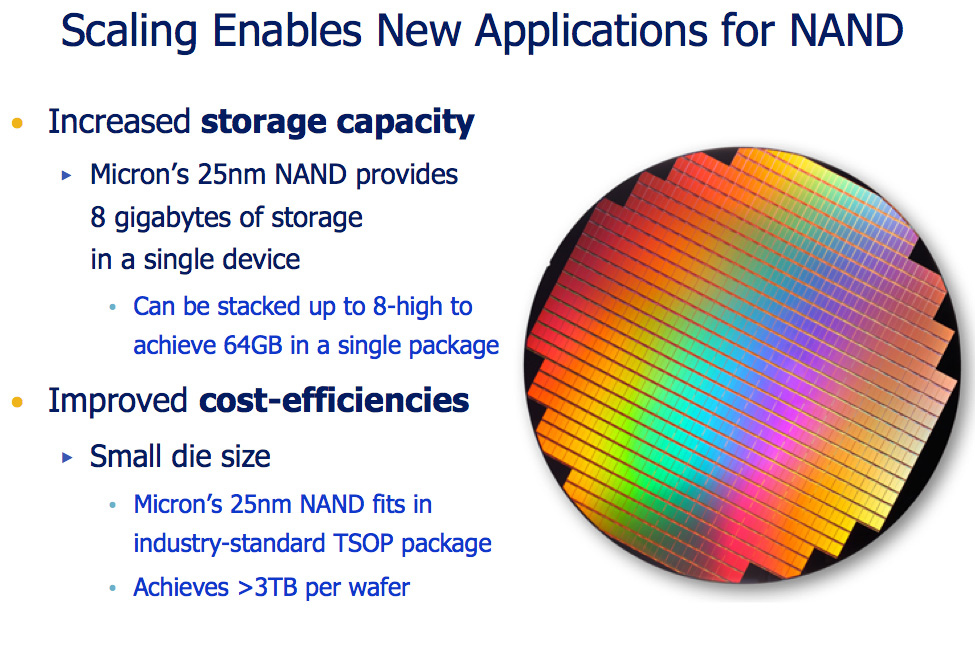
Eleven months ago Intel and Micron, jointly as IMFT,announced intentions to move to 25nm NAND by the end of 2010. For the past few months, IMFT has been shipping 25nm NAND although none of it has ended up in the high performance SSDs we love to cover just yet.
The problem, as with a jump to any new manufacturing node, has to do with yields. In the microprocessor space, new processes generally mean you can’t reach your clock targets and you may use more power than you’d like. The more experience you have in working with the process the more you can get these two variables under control and eventually you have a technology you can ship to the market.
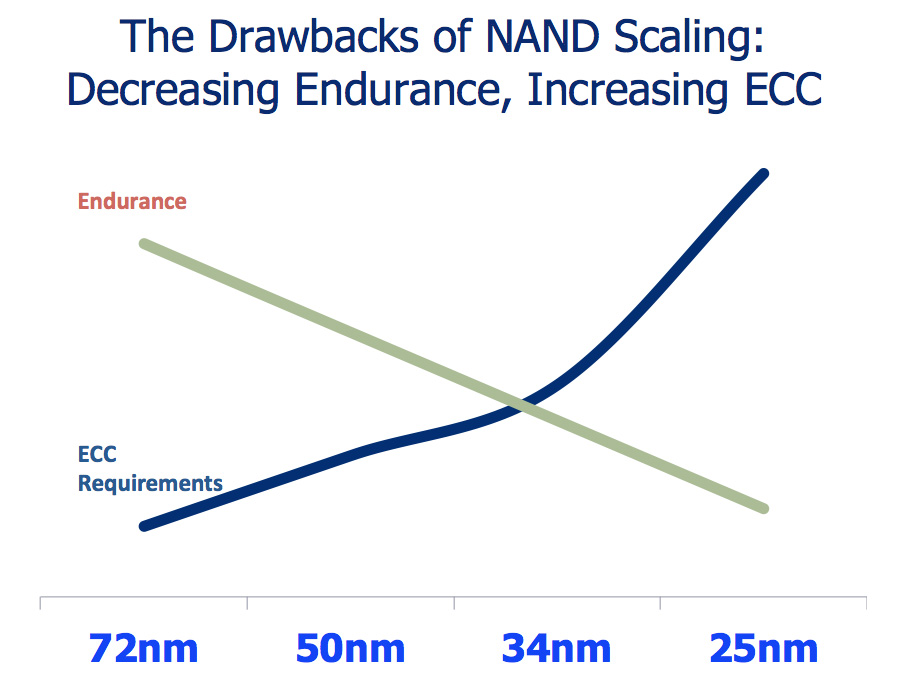
The same is true with NAND, although the vectors of improvement are a bit different. Rather than clock speed and power (although both are affected) the main focus these past few months has been increasing endurance and reducing uncorrectable bit error rate.
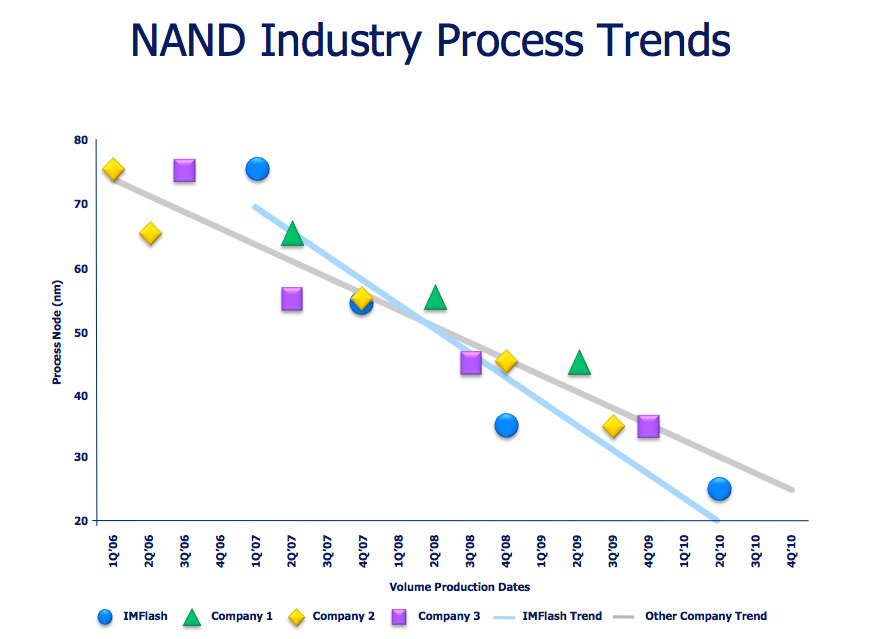
When I first started reviewing SSDs IMFT was shipping 50nm MLC NAND rated at 10,000 program/erase cycles per cell. As I mentioned in a recent SSD article, the move to 3xnm cut that endurance rating in half. Current NAND shipping in SSDs can only last half as long, or approximately 5,000 program/erase cycles per cell. Things aren’t looking any better for 25nm. Although the first 25nm MLC test parts could only manage 1,000 P/E cycles, today 25nm MLC NAND is good for around 3,000 program/erase cycles per cell.
The reduction in P/E cycles is directly related to the physics of shrinking these NAND cells; the smaller they get, the faster they deteriorate with each write. Remember this diagram?
That’s an N-channel MOSFET, the building block of a NAND memory cell. Electrons travel through the tunnel oxide and make their way to the floating gate when a NAND cell is written to. The electrons are removed when a cell is erased. Each round trip is a single program/erase cycle. The process actually weakens the tunnel oxide. The smaller the tunnel oxide, the weaker it becomes, hence the decreasing p/e cycles I mentioned above.
Thankfully this doesn’t have to mean that a 3xnm SSD will die quicker than a 50nm SSD. Moore’s Law guarantees that our SSD controllers can grow in complexity and performance alongside each NAND generation. In theory, a better controller could drive write amplification lower and thus use those program/erase cycles more efficiently. This is exactly what we have seen thus far. SandForce’s SF-1200 is the perfect example of a controller-based solution to the problem of decreasing endurance with smaller geometry NAND. Even new controllers from Indilinx, Toshiba and Samsung have managed to reduce write amplification and increase performance to combat decreasing endurance.

How SandForce deals with the problem of reduced endurance and increased error rates
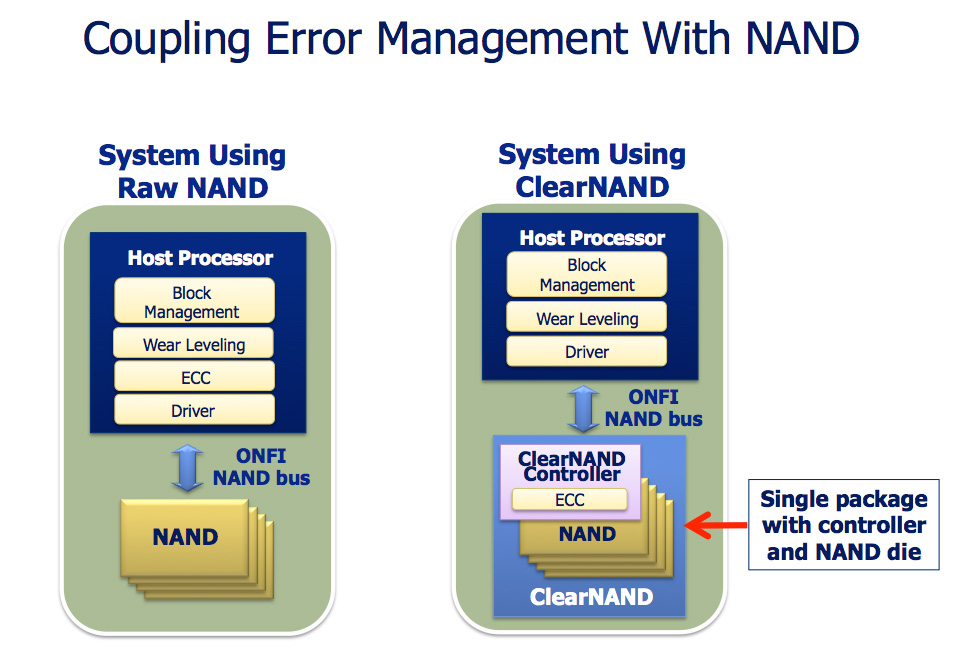
Error rates also skyrocket as a function of process geometry. The supply-demand-like curve above shows just that. SandForce integrates ECC/CRC into its controller as well as enables data redundancy across all NAND in its drives in order to combat increasing error rates with smaller geometry flash. The end result is a very forward looking, sophisticated and expensive SSD controller. What Micron plans to offer however is an alternative. It’s called ClearNAND:
The idea is simple. Instead of placing the burden of dealing with increasing error rates on the controller, Micron will internalize the problem and equip each NAND device with an ECC controller.
The NAND will still appear to be an ONFI complaint device with the same number of pins as a regular 25nm ONFI NAND device (a single unused pin, VDDI, is now put to use in ClearNAND). The bus interface remains the same and NAND controller manufacturers don’t have to do anything differently.
On each ClearNAND device you get a 24-bit BCH ECC engine, although Micron says that in another generation or two we’ll start seeing more exotic ECC algorithms.
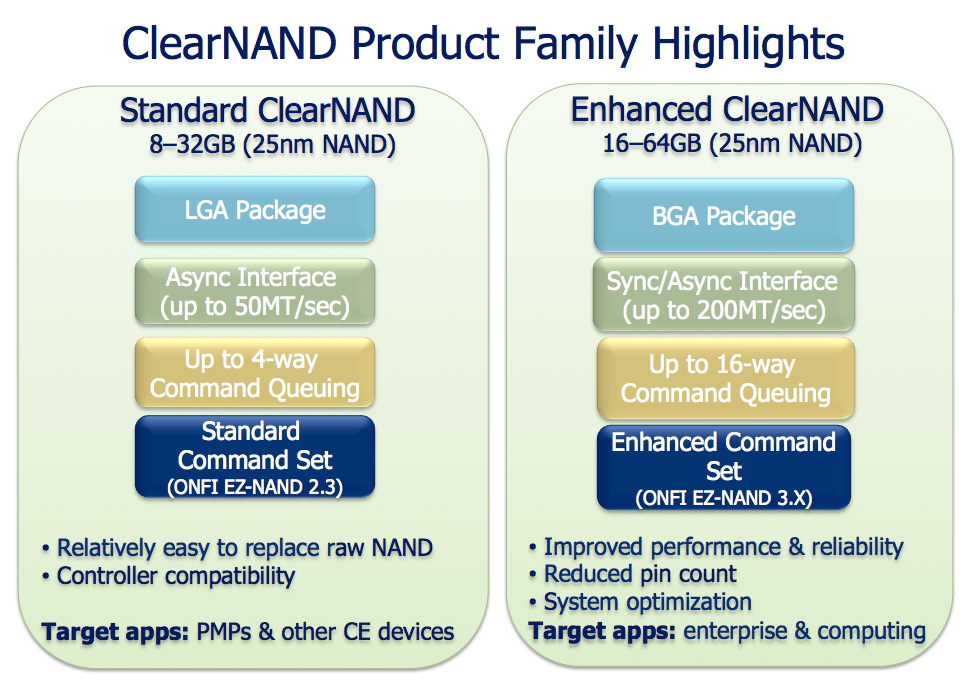
ClearNAND will be available starting at the 25nm node in two versions: standard and enhanced. Standard ClearNAND devices are low performance, you only get up to 50MB/s per device and up to 4 simultaneous read/write ops to the device at the same time. Enhanced ClearNAND doubles maximum capacity from 32GB to 64GB per device, quadruples interface bandwidth (200MB/s) and supports up to 16 simultaneous read/write ops. Enhanced ClearNAND would be the NAND of choice for an SSD, while Standard ClearNAND would be better suited for an iPod or smartphone for example.
Raw 25nm NAND will still be available, Micron is simply offering ClearNAND as a solution to those customers who don’t want to integrate ECC engines into their controllers.
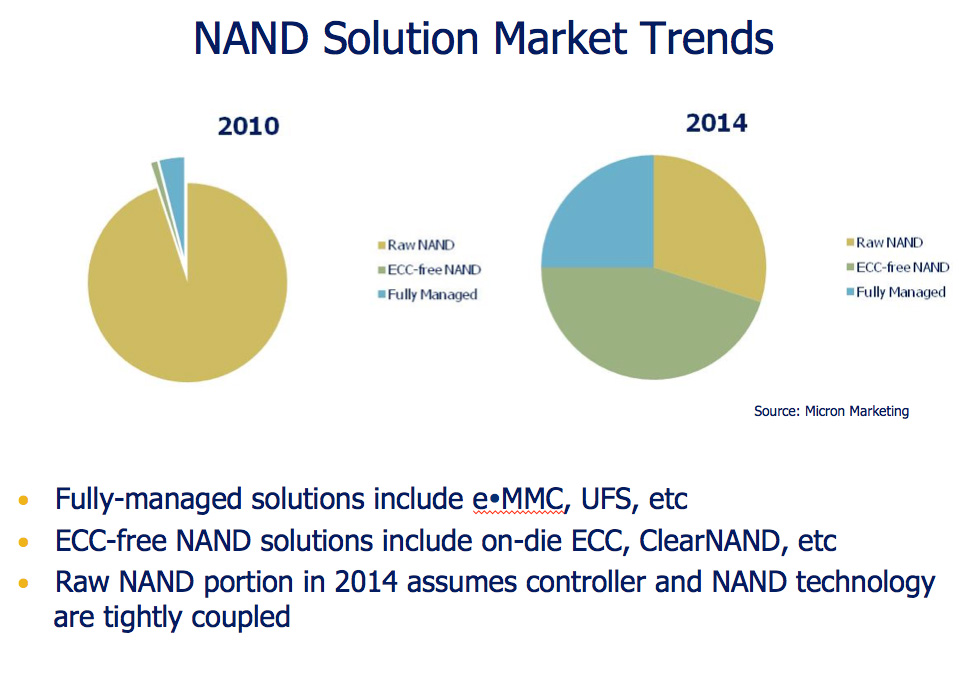
Today the need for something like ClearNAND isn’t huge, however in the next few years Micron expects ECC equipped NAND to be the most prevalent form of NAND in the market. This would make sense as error rate goes up as process size decreases, however it does assume that the ECC requirements can’t or aren’t handled at the controller level in the future.
There’s obviously a price premium associated with ClearNAND. However since we aren’t a customer of Micron, we aren’t exactly privy to specific pricing information.
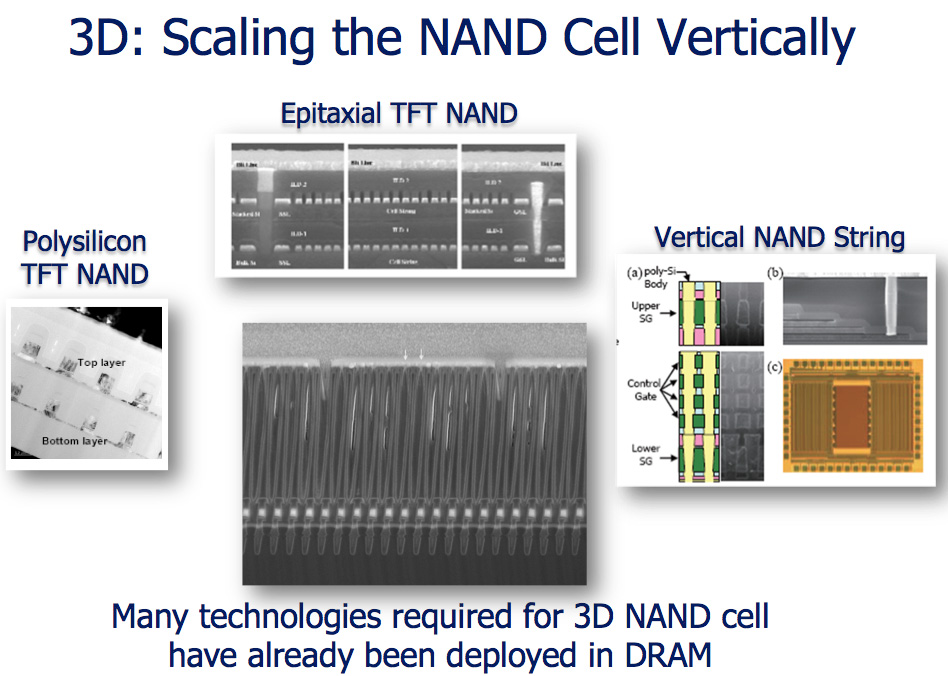
Eventually we will hit a physical wall with NAND scaling. Micron reaffirmed its commitment to research into technologies that would extend the lifespan of NAND (e.g. 3D die) or potentially augment its role in a system (e.g. phase-change memory). That’s still a few generations out though.
I don’t expect to see the first consumer SSDs to use 25nm NAND (ClearNAND or raw) until 2011. Intel’s 3rd generation X25-M will be one of the first (if not the first) and is currently scheduled to ship in Q1 2011.

Sunday, May 23, 2010

Hard Drives to reach 3TB in 2010?


Sources close to Seagate roadmaps have leaked the potential of a 3TB SAS drive being released this year.
The quest for storage is almost a never ending saga.  Dubbed the Constellation-ES, the replacement for the Seagate Barracuda-ES, the drive is expected to arrive later this year with a 7200 RPM rotation speed, and a 6Gbit/s SAS interface.  A 1TB version of the 2.5" Barracuda-ES is also expected to arrive around the mid year point.
A 3TB drive would suggest an increase in maximum platter size, from the current 500GB limit.  If you remember back that far, the increase in density was due to a change in bit alignment, from horizontal to vertical, to counter the superparamagnetic effect.  Hitachi made an excellent and funny flash animation to describe the technology.  The feeling is that the increase in platter size is an extension of that technology, rather than a new physical property being exploited.
Depending on how quickly these new hard drives hit the enterprise sector, we could see consumer 3TB hard drives by the end of the year as a positive estimate.  However, 17GB/$ ($175 a unit) or a price comparable to current 2TB hard drives would be required for consumer market acceptance.  Whether people require 3TB is another matter - video editors, professional photographers, or just for storing your movie and blu-ray collection are possibilities.

Sunday, September 6, 2009

System Buyers Guide: PCs under $800

AMD HTPC

Everyone asks for HTPC component recommendations, and then when we publish them readers can't wait to throw rocks at our recommendations. Perhaps this is because the HTPC, more than any other computer class, is a very personal machine. It needs to meet the specific needs and demands of the end users, who vary widely in what they plan to do with their new HTPC. So let's first talk about our concept in these two HTPC configurations.

We are assuming the user already has the HDTV (likely) or display he plans to feed, along with a sound system for that HDTV. The motherboards we recommend can reasonably feed audio signals for your Blu-ray movies, but they are not integrated audio amplifiers. Since most end-users are on cable or satellite for TV, we will make no recommendations at all for a TV tuner. Of the many possible uses of an HTPC the great majority of end-users store, play, and stream movies with their HTPC computers. That is mostly what their HTPC systems are used for and that is where we have concentrated our recommendations. In general the processing power in both systems has increased since our December 2009 guide, but costs have gone down a bit.

AMD HTPC System
HardwareComponentPrice
ProcessorMD Phenom II X3 710
(2.6GHzx3, 3x512KB L2, 6MB L3 Cache)
$119
CoolingCPU Retail HSF$-
VideoOn-Board$-
MotherboardASUS M3N78-EM$90
Memory4GB DDR2-800 - GSkill F2-6400CL5D-4GBPQ$37
Hard DriveWestern Digital Caviar Green WD10EACS 1TB SATA 3.0Gb/s Hard Drive - OEM$105
Optical DriveLG BD/HD DVD / 16x DVD+/- RW GGC-H20L - Retail$110
AudioOn-Board$-
CaseSILVERSTONE Black Aluminum/Steel LC13B-E ATX HTPC Case (After $15 Rebate)$100
Power SupplyPC Power & Cooling Silencer PPCS500 500W ATX12V / EPS12V SLI Ready CrossFire Ready 80 PLUS Certified Active PFC Power Supply - Retail (after $25 Rebate)$50
Base System Total$611
Keyboard and MouseLogitech Cordless Desktop EX110 Black USB RF Wireless Keyboard & Optical Mouse$30
Operating SystemMicrosoft Vista Home Premium OEM$99
Complete System Bottom Line$740

The CPU chosen for the AMD HTPC computer is the new triple core Phenom II X3 710 with 6MB of L3 cache. You get the expanded processing power of the Phenom II, which is always useful in an HTPC, at the same price as the older Phenom CPU chosen in the December guide. The three CPU cores each run at 2.6GHz, each with a 512KB cache, and a shared 6MB L3 cache - the same L3 cache sized shared on Phenom II quad-core processors. We hesitate to call a Phenom II X3 CPU a low-end chip, but this is certainly the most reasonable Phenom II you can buy. It has plenty of power, however, to drive your AMD HTPC to most anywhere you choose to go.

With DDR2-800 so reasonable these days we equipped the HTPC with 4GB of G.Skill memory. We aren't really interested in overclocking this HTPC (though it's technically still possible), and spending additional money on even higher performance RAM just doesn't make sense. 4GB of memory, however, does make perfect sense in an HTPC box.

The $90 ASUS M3N78-EM is based on the NVIDIA GeForce 8300 chipset. The board features one PCI-E x16 slot, one PCI-E x1 slot, two PCI slots, 8GB memory support, NVIDIA Gigabit LAN, 7.1 HD audio, 12 USB ports, five 3Gb/s SATA ports with RAID support, IEEE 1394a, one eSATA port, HDMI/DVI/VGA output, and full support for the Phenom 140W processors. This board offers overclocking capabilities along with being a top notch HTPC capable board. We highly recommend the GF8200/8300 series for the HTPC market due to hardware accelerated Blu-ray/H.264 playback, multi-channel LPCM output, and very good application performance.

As we discussed in the HTPC introduction, we did not include a TV tuner in the configuration since most end-users are now using their cable and satellite feeds. Few users, therefore, have any real need for a TV tuner card. There's something else to consider in this, and that is the US government mandated deadline to end analog broadcasts (which is now in June), so older/cheaper analog tuner cards are now useless unless you have an analog Cable/Satellite signal. If you truly need a Digital TV tuner, one option that is pretty unique on the TV tuner side is the HD HomeRun from Silicondust USA. This is a dual HDTV tuner/recorder that functions over a network and provides ATSC/QAM support. The price of $169 is more than many other options, but this is arguably a more flexible overall solution - particularly with the mandated move to digital and away from analog.

What's the point of having an HTPC if you don't have a lot of storage space? To that end, we selected a newly affordable 1TB (1000GB) Western Digital Caviar Green WD10EACS SATA hard drive at just $105. The WD Green is a variable speed energy saving design that we found to be among the quietest drives we have ever evaluated. For an HTPC, quiet operation is paramount and this WD Green will not disappoint. The WD Green is a bit slower than true 7200RPM 1TB drives, but the real performance difference is very minor. Another excellent HD option is the Seagate Barracuda 7200.11 ST31000333AS 7200RPM 1TB at $110. Performance of this 1TB drive has been exemplary in early testing at AnandTech, and the drive has proved to be reasonably quiet. Seagate also makes a super-reliable 1TB drive optimized for video storage and retrieval called the Seagate SV35.3 ST31000340SV 1TB at $150. This "video" Seagate features 24x7 reliability with > 1 million hours MTBF and improved read/write reliability. For those willing to pay the small premium the "video" Seagate would be a good alternate choice.

The optical drive is certainly an upgrade to the entry and budget systems since a reasonable HTPC requires Blu-ray playback capabilities. The LG Black 6X Blu-ray SATA fits the bill without breaking the bank. It provides 6X Blu-ray playback and the fastest recording and playback of DVD and CD media. The current price is around $110, but this drive sometimes goes on sale for $100 so look out for specials. There are also Blu-ray options under $100 from Lite-On and a 6X Blu-ray player at $105. We do not have much experience with this Lite-On drive, but Lite-On drives in the past have proved reliable. That would make the Lite-On Black 6X Blu-ray SATA a more reasonably priced alternative where every penny counts.

Our choice for an HTPC case is the audio component look in the Silverstone LC13B-E, which is an extremely flexible design with two silent fans and silent power when combined with the PC Power and Cooling 500W Silencer power supply. This solid Silverstone case can handle either ATX or Micro ATX motherboards, with space for four internal hard drives in addition to two 5.25" External bays and two 3.5" external bays. If your plans for your HTPC include lots of comportments and storage the Silverstone is an excellent choice. If you prefer a small cube case the Lian Li PC-V350B is a gem of a small black aluminum case. The Lian Li is our choice for the Intel HTPC system on the next page, and you can find more information on that case there.

Since most will place their HTPC near their HDTV or big screen monitor, a wired keyboard and mouse are not really very useful in most setups. Control is more often from across the room, so a wireless RF Logitech keyboard and mouse were selected. At just $25 for the pair, the Logitech Cordless Desktop EX110 wireless keyboard and mouse is a great value. This is also the HTPC preferred RF wireless set, which does not require "line of sight" that is needed for IR wireless.

The final price of the AMD HTPC comes to just $740. That has to be considered a bargain considering the triple core Phenom II CPU, 4GB of memory, and 1TB hard drive all housed in a quiet Silverstone HTPC case with a PC Power and Cooling Silencer 500W PSU. You can certainly spend even less on a basic HTPC box, but we doubt you can build a more powerful or quiet system for the same money.


Seagate 7200.10 500GB: Hitting the Sweet Spot


Seagate announced the Barracuda 7200.10 series over a year ago as the successor to their Barracuda 7200.9 series with much surprise as that particular product line had only been marketed for a very short period. The Barracuda 7200.10 series quickly became their flagship product for personal desktop solutions with the 7200.9 series quickly being regulated as a value performance offering. The Barracuda 7200.10 product was the first desktop centric hard drive to feature perpendicular magnetic recording technology

While Seagate has not introduced capacities larger than
750GB or revised their product lineup since a year ago that does not mean they have not been busy. Their new 7200.11 series will be introduced shortly that features their next generation PMR technology. Along with several new product enhancements, Seagate will increase their per-platter capacities to 250GB and early testing shows sustained transfer rates right over 100 MB/s not to mention improved seek times. The new 7200.11 series will feature capacities from 250GB to 1TB.


While that is an interesting bit of history as well as a brief look at what's coming down the pipeline, we are here today to discuss the Seagate Barracuda 7200.10 500GB drive. Historically, our Buyer's Guides have allowed 500GB hard drive recommendations in only the highest end systems where price is less of an issue. As hard drive capacities have now soared to 1TB range, we now see that 500GB drives have finally reached a point where they are a solid if not spectacular value for the majority of end-users who use their systems for everything from video/audio encoding to gaming. We are now seeing the 500GB drive category quickly becoming the new sweet spot for the desktop from both a cost and performance viewpoint.

Indeed, a quick look at today's prices shows that several 500GB hard drives have fallen below the $0.25-per-gigabyte level. The Seagate 500GB 7200.10 drive in particular has reached a threshold of $0.24 per gigabyte, making it one of the better values on the market today. However, we have to be honest here as the most recent 500GB desktop centric drives from Samsung and Western Digital offer a cost per gigabyte of $0.22. Our next storage article will take a look at these two drives.

Drive capacity is only one variables in the equation, however. Now that pricing has become very competitive, the consumer is able to look more aggressively at the feature set of the drives. Cache size, platter capacity (and number of platters), noise, thermals, power consumption, and warranty/support are only a few of the categories manufacturers need to address in order to earn a recommendation in our labs.

In this review, we will see how much attention Seagate has paid to these categories when developing their 7200.10 500GB hard drive, and if it shines above the direct competition from Hitachi's T7K500 in this increasingly crowded field. Let's find out how the Seagate 7200.10 500GB performs against other SATA based drives in its class.