Click

Showing posts with label Gadgets. Show all posts

Wednesday, April 24, 2013

Samsung Galaxy S 4 Review Part 1

It’s no secret that Samsung enjoyed huge success with Galaxy S 3 (henceforth SGS3 and SGS4 for Galaxy S 4). In many markets, SGS3 was easily the Android handset to beat, even as faster and arguably better hardware became available during the life of its product cycle. Samsung nailed the branding, marketing, and consistency battles with its third generation of Galaxy smartphone, and now we’re a year later and facing down SGS4.

There's always that question about how you follow up something that was wildly successful with another product, and carry over what was good about the previous generation that made it successful. There's no denying that Samsung is in an interesting position here, facing opposition from players desperate to get more market share against the now well-established player that is Samsung. At the same time Galaxy S 4 is by very name an iterative product. 
Putting together an Android flagship is superficially a pretty easy thing to do, and the story of the Galaxy S 4 starts out much the same as any other Android flagship from this generation. There's a 1080p 5-inch display on top, the latest and greatest CMOS sensors for front and rear facing cameras (2MP and 13 MP respectively), a powerful Snapdragon 600 SoC (which is really APQ8064AB, but more on that later) with four Krait 300 CPUs running at up to 1.9 GHz and an Adreno 320 GPU at up to 450 MHz, 2GB of LPDDR3 RAM, microSD in addition to built in storage, and removable 9.88 watt-hour battery. On the connectivity side of things we get LTE connectivity in the appropriate markets courtesy of the ubiquitous MDM9x15 LTE/WCDMA/CDMA2000/GSM multimode baseband, WLAN and Bluetooth from the latest and greatest BCM4335 802.11ac/BT 4.0 LE combo chip, and NFC from Broadcom's BCM2079x chip. There's also a new generation of touch controller inside from Synaptics, and Audience's latest eS325 noise rejection and suppression voice processor for calls. Long story short, SGS4 is packed full of absolutely the latest and greatest everything on basically every axis possible. 
Samsung has done a good job of answering most of the questions we've had about the Galaxy S 4 prior to ever getting our hands on final hardware. From our earlier preview and experience with the device we got a good feel for the software customizations, as well as what hardware we should expect to see under the hood. Today, armed with final hardware and final software (Android 4.2.2 and TouchWiz atop it), we can try to fill in some of the remaining blanks. 

I like to start with aesthetics and hardware. There's no doubt that superficially the SGS4 shares almost all of its industrial design language with SGS3 and the Galaxy Note 2, which themselves are iterations of the design path that Samsung started down arguably with the T-Mobile SGS2 (SGH-T989) and AT&TSGS2 what feels like an eternity ago. At first the "inspired by nature" motif made sense with the rounded appearance on SGS3, with SGS4 it's obvious this is a refresh which capitalizes on everything that made the SGS3 popular. This is the iPhone school of thinking — you have an industrial design now that is borderline a trademark, it's selling well, and if you have something that's popular, why change it?
That's not to say there aren't changes, the SGS4 feels shockingly different in the hand than the SGS3. The SGS3 previously had a very tapered backside with a large radius of curvature. The SGS4's profile is now more squared off basically everywhere. The result is a handset that feels thicker because it is — at the points which previously were thinnest on the SGS3. 


 Samsung continues its liberal use of its favorite thermoplastic with SGS4, but what's always intriguing to me is how much it tries to make its thermoplastic exteriors look like something else. The SGS3 undoubtedly tried to mimic a faux aluminum appearance, with SGS4 there's now a faux carbon fiber motif going throughout, with a diamond checkerboard pattern that prevails on the front and back. The edge lip is still a faux brushed chrome metal material which I thought we had moved past with SGS3. 
Much debate has been made around Samsung's continued use of plastic vs. metal in the industrial design of its smartphones and tablets. Unfortunately, the Galaxy S 4 isn't exempt from this debate. Samsung's public stance has always been that it optimizes its material choice to keep weight as low as possible. That's a noble way to take things, although the unmentioned benefit is that it obviously keeps costs low as well. The weight argument is an interesting one. If you compare the all-plastic Galaxy S 4 to the all-metal HTC One, there's a difference of 13 grams. Whether or not the weight difference is noticeable really depends on the user, but it's clear that cost reduction is just as big of a factor (if not more) in Samsung's affinity for plastic than simply saving weight. There's no getting around the fact that other OEMs are bringing increasingly sophisticated materials choices to bear with their designs, and this is an obvious weak point for SGS4.
 What has improved dramatically with SGS4 are the buttons, which now are surprisingly awesome. There's a beveled edge around the outside, which makes them sharp and locatable with a finger instantly. I have to admit I always loathed the rounded glossy buttons on the SGS3 which blended into the equally glossy shiny plastic around it. Even the physical home button gets this treatment, and feels much more communicative and clicky. Also worry not, they're all still in the same places, with the power button about three fourths up the right side, volume rocker three fourths up the left side. Samsung's capacitive menu and back buttons are unchanged, Samsung still hasn't gotten around to reading Google's "Say goodbye to the menu button" post, which still is a hilarious read in the context of the release and review of what will probably be 2013's most popular smartphone, which still carries a menu button. Or maybe Google just can't enforce this particular decree? Either way, for SGS3 users upgrading to SGS4 all of the buttons and human input outputs will be familiar territory. 
 Up top there's the earphone jack, secondary microphone port for noise cancelation and stereo audio in video recording, and an IR port. I can't emphasize enough how happy I am that we finally are getting IR back in devices. 


At bottom in the middle is microUSB, we're long past this being at the top or some other weird place. Next to that is the primary microphone.
On the back the SGS4 starts to look a lot different from the SGS3. The flash is now below the camera module, and the camera port and black region is now correspondingly much larger, with a bit of a pronounced bump. There's no Sprint branding on this particular variant, just Samsung at the top and Galaxy S 4 (no IV, no Roman numerals, it's 4 this time) at the bottom. At bottom left is a cutout and small raised bump for the speakerphone. 
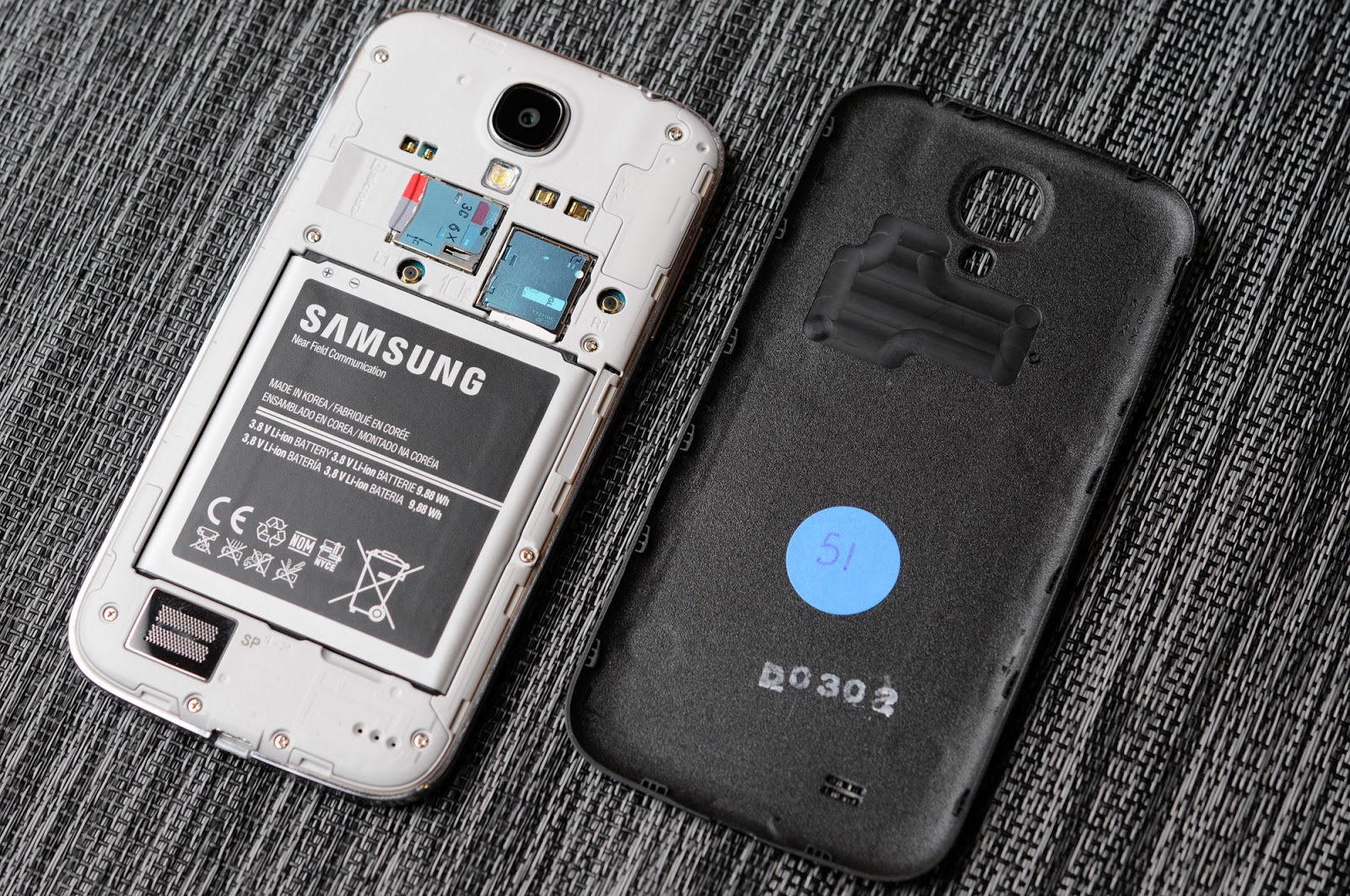
 Samsung continues to differentiate its phones by including a removable back cover, and underneath it, removable battery, microSD expansion, and microSIM card tray. I'll admit that I instantly popped in my SanDisk Ultra microSDXC UHS-1 64 GB card when I got the SGS4 just because I can.
The reality is that inclusion of even these basic features overrides any industrial design tradeoffs for many shoppers, so it's probably something which will continue to be a dominant feature on Samsung flagship handsets. Along with that obviously comes the ability to run an extended battery with a different, accordingly larger battery cover.
 That brings me to the S View Cover, which is perhaps one of the cooler new additions on SGS4. This is an improvement on the flip cover which debuted with SGS3. What's different is that now the cover both unlocks the phone when opened and no lock screen password or code is set, and also there's a small window up top which includes information like notifications, the clock, status bar, and call screening information. It's an awesome feature and one of those things that only Samsung can do with SAMOLED. 
When it comes to software, I'm grateful that Samsung is running Android 4.2.2 on the SGS4, even if the next version of Android is just around the corner.
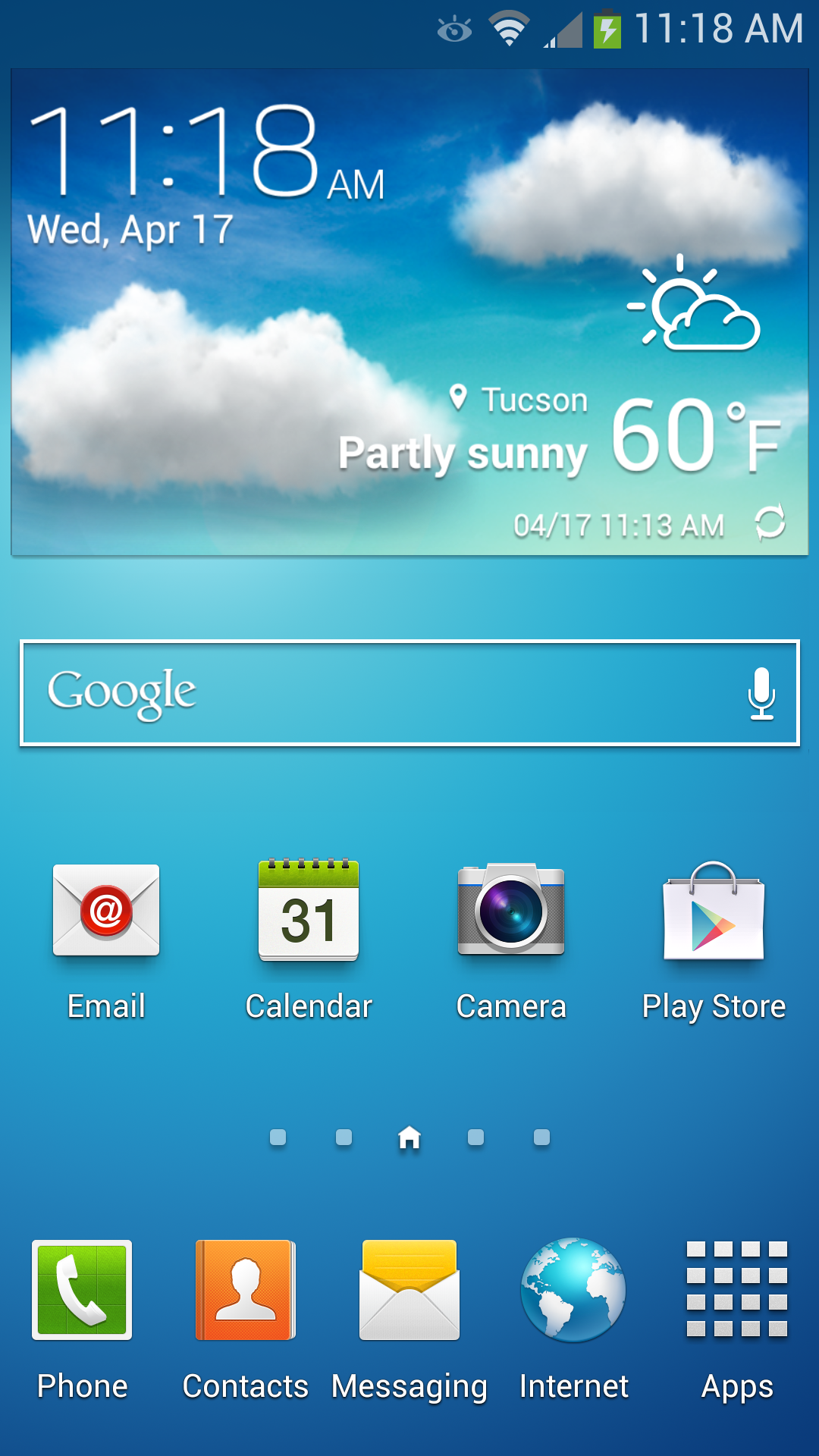
 
The TouchWiz story is really a short one — it's still there, and it's fundamentally unchanged, there's just more of it. The launcher, widget panels and home screens are all the same as they were in previous iterations. Messaging looks superficially different, and SwiftKey now seems to power some parts of the stock keyboard's correction engine, even if the stock Samsung keyboard for me still is difficult to use with its very conservative autocorrection settings. 
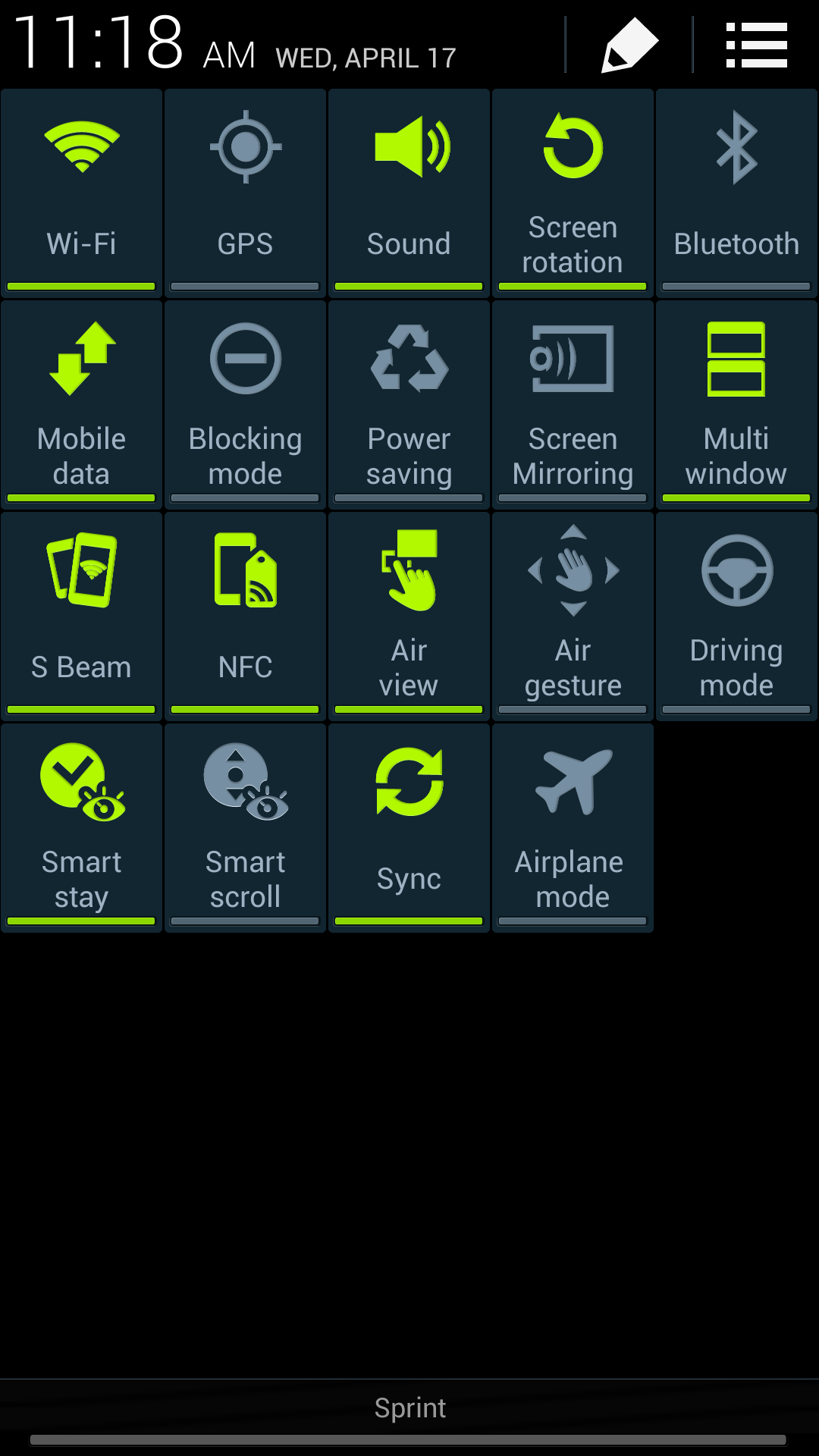
 
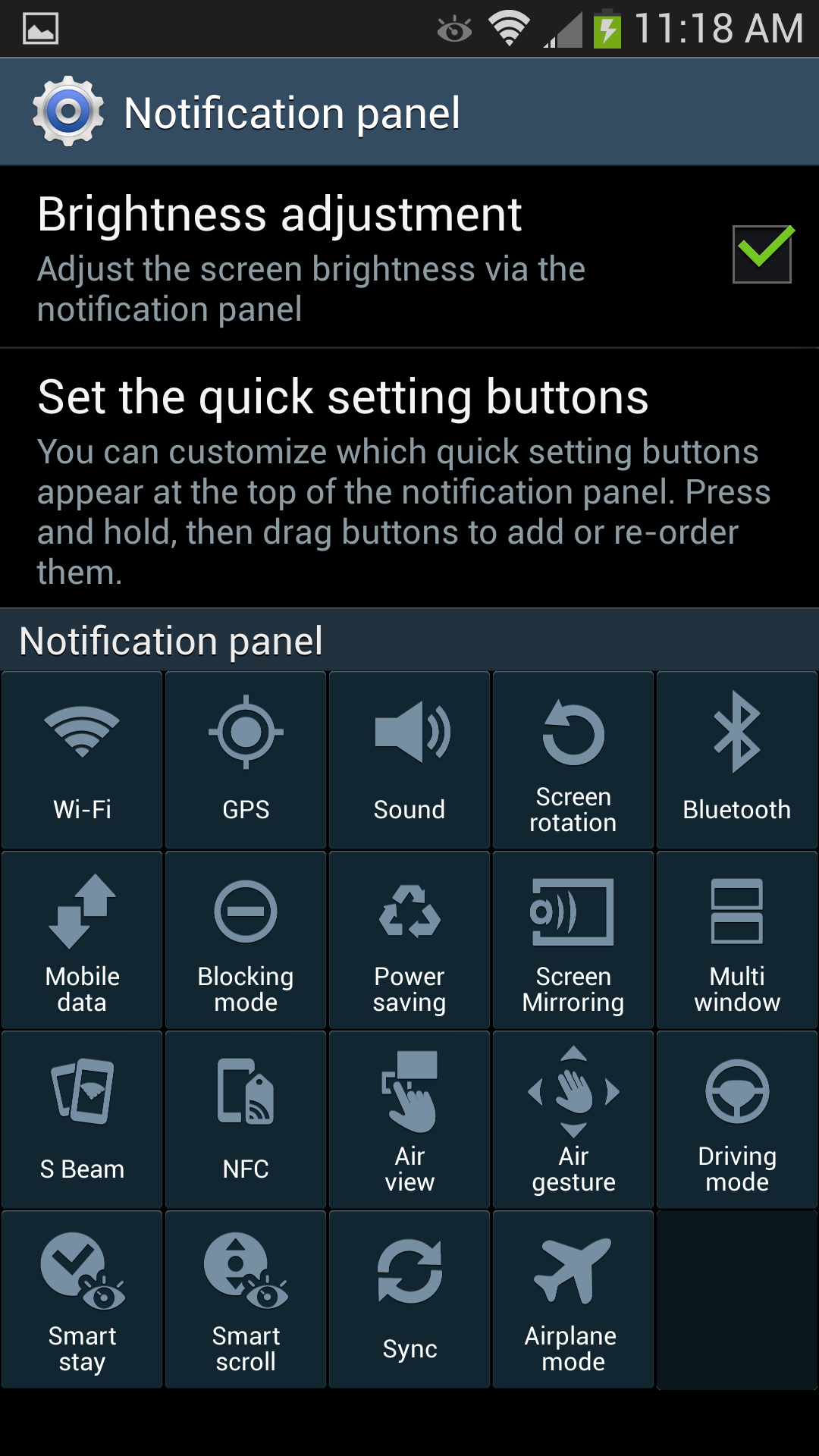
What gets a big change on SGS4 is the notification panel, which builds on the stock 4.2.x feature with a ton more toggles (19 of them). It's almost overwhelming at first, of course you can still get to these by scrolling the top settings pane left and right just like in the previous version. These are also customizable. 
 
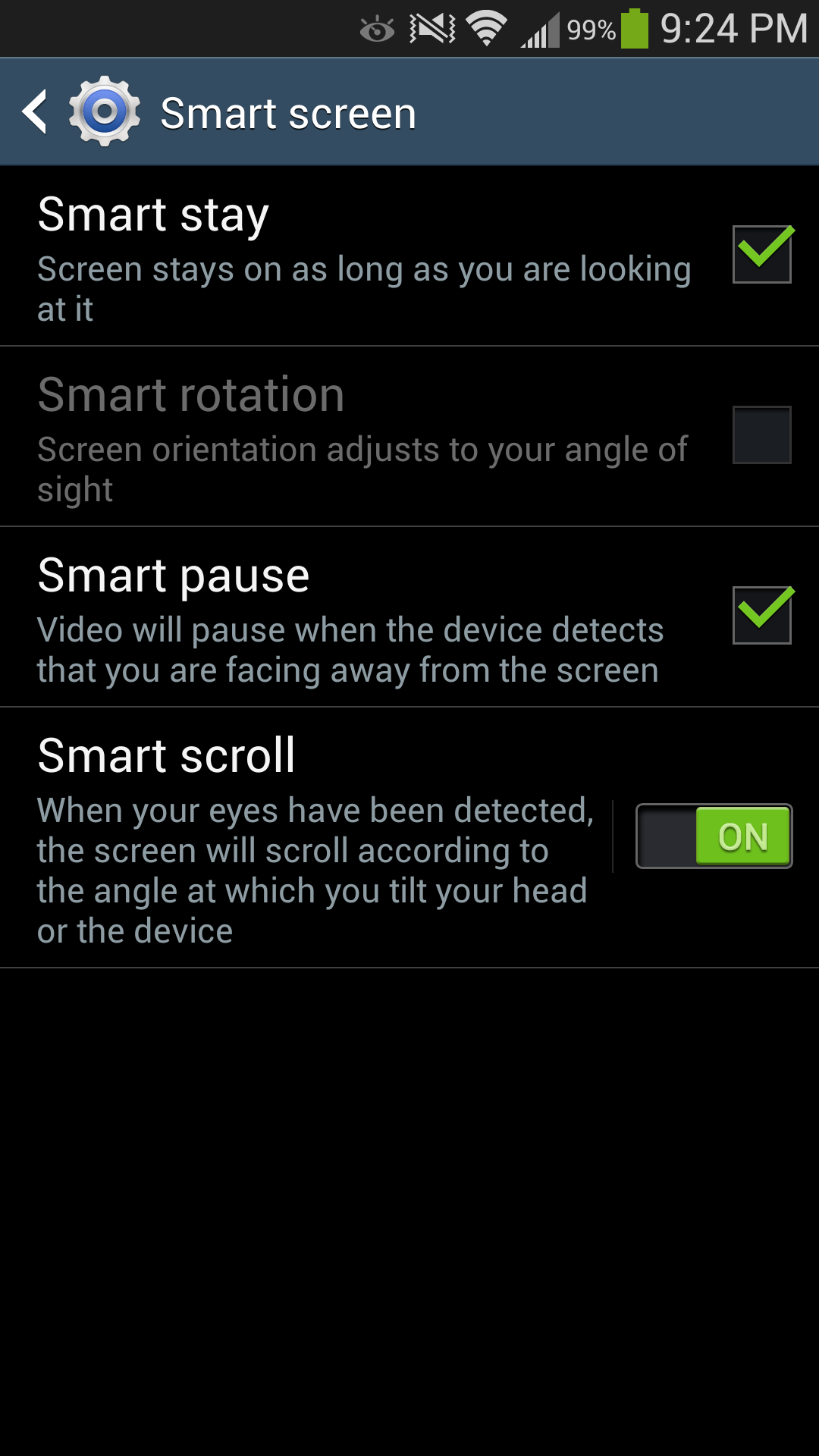
Also present are Air View which works with the new generation of Synaptics touchpad to detect a finger hovering over some part of the display. Basically all of the first party Samsung applications have some sort of Air View functionality, exposing either additional information, a preview, or zooming (in the browser) content when you hover your finger over a region for an extended period of time. I find it difficult to hover my finger over the screen without touching it, but in the gallery and sock browser it is admittedly sometimes useful. Smart pause and Smart scroll also are new features which build on the eye and head tracking features built into the hardware and exposed previously as Smart stay. I found that Smart scroll does work in the browser surprisingly well for scrolling content, you have to look pretty fiercely at the bottom or top regions, but it works. Smart pause works, but I sometimes had issues with it pausing while I was still looking at video, either in YouTube or the gallery. Of course both of these rely on the front facing camera and need your face to be well exposed. 
I think credit is due to Samsung for at least trying to convey a useful software and feature side of the story for the hardware – after all, if it's there, you need to demonstrate it. 

 
I also like that the multi window functionality carries over to SGS4. My use case frequently involves looking at twitter and the web side by side, which is perfect with the official Twitter client and Chrome, or Falcon Pro and Chrome. I wish my IM client of choice (imo.im) worked with this feature so I could have chat side by side with another application, that would really sell me on TouchWiz delivering something which functionally changes my use patterns above other variants. 
I should say that despite our limited time with the device, Samsung took a step in the right direction by giving us a week with the Galaxy S 4. I still believe that flagship devices need about a month of real use for a complete evaluation, but at least we had more than a couple of days with the Galaxy S 4. There's still a lot more we want to do on SGS4 and even though this is our review there's still more that needs to be fleshed out. For now, think of it as a part one of sorts. There's also the Exynos 5 variant of the SGS4, which is the device both Anand and myself are really interested in. 
Now for the bad news. According to Samsung PR, in an effort to get us a device as soon as possible an unusual sacrifice had to be made: our Galaxy S 4 review sample operates exclusively on the Sprint network. AT&T, T-Mobile and Verizon review units would soon follow (apparently there were a handful of T-Mobile review units set aside for specific sites at the behest of T-Mobile), but for now all we've got to review is the Sprint Galaxy S 4. Like the 3rd generation model that preceeds it, the Galaxy S 4 ships with identical specifications across all US mobile operators - so the hardware here should be identical to what you'd get on AT&T or any of the other operators. The downside is that it's near impossible to use the Galaxy S 4 as a stand-in for any other device in our normal day to day usage thanks to just how bad Sprint's cellular performance is on 3G/EVDO, especially in my market:

  
Obviously in areas where Sprint has LTE deployed the situation should be better, but as we found in our early testing of Sprint's LTE network that is not necessarily the case - not to mention the bigger issue being that Sprint LTE just isn't widely available at this point. None of this really matters to the Galaxy S 4 as a device, but it does prevent us from investigating a lot of the things we normally would in the process of reviewing a flagship smartphone, to say nothing of impacting the ability to offer our thoughts about using it as a real daily driver.

Monday, January 4, 2010

Epic Demonstrates Unreal Engine 3 for the iPod Touch/iPhone 3GS

I got together with Mark Rein last week and he showed me an Unreal Engine 3 tech demo running on a 3rd generation iPod Touch. The same Unreal Engine 3 that powers Gears of War 2, running on an iPod Touch. The engine also works on the iPhone 3GS, and Mark tells me that we’ll see it on another mobile platform at CES (hmm...).

The demo is both playable and has a flythrough. It’s using a modified Unreal Tournament level previously shown off at GDC. A virtual thumbstick on the left side of the screen controls your movement, while tracking your thumb in the lower right corner of the screen controls the camera. Just tap the screen to shoot. Mark said this is a tech test bed and they’re experimenting with several different control schemes including ones with tilt.

In practice, the controls work well. This is just a demo so there was no score or point to the game, I just got to run around and kill a single respawning enemy. And it was fun.

As you can see from the video the frame rate was smooth. There are more visuals to be added, as well as some polishing, but the demo looked very good for an iPhone game.

It requires OpenGL ES 2.0, so the iPhone 2G and 3G won’t work, nor will the older iPod Touch models. It doesn’t really matter though, this is just a starting point.

Epic isn’t announcing any sort of iPhone engine licenses nor are they entering the iPhone game market. Porting UE3 to the iPhone is simply one of many projects being worked on inside a newer, more svelte and innovative Epic Games (wait till you see what’s next...).

Today the iPhone, Tomorrow the World

Mark said they planned to make this available to licensees at some point in the near future. That’s great for end users because it means that any Unreal Engine licensee can now start playing around with making iPhone games based on the same technology. Unfortunately the recently announced, free to the public, Unreal Development Kit (UDK) is Windows only - the iPhone version isn’t included. I’d guess that at some point Epic will change that, it just makes too much sense. Doing so would enable a whole new class of iPhone game development using an extremely polished engine.

It’s all about taking the portable market seriously. While I wouldn’t expect to see any Epic branded iPhone games anytime soon, eventually it wouldn’t be too far fetched to see a full port of Gears of War to something as small as an iPhone. NAND Flash capacities to support multiple 9GB games will be there in another few years, as will GPU horsepower.

Remember that the SoC in the iPhone 3GS is only built on 65nm technology, Intel is about to release its first 32nm chips. You could cram four times as many transistors into the same space at 32nm, roughly 9 times as many at 22nm. Remember that graphics performance scales very well with additional transistors. At what point does the smartphone become more powerful than an Xbox 360? Sometime in the next 3 - 5 years for sure.

And it’s not just about iPhone support. Mark told me that as soon as CES we’ll see Unreal Engine 3 on another mobile platform entirely. More announcements will happen throughout 2010. This isn’t a platform specific thing, it’s about bringing Unreal Engine 3 to the entire portable market.

Final Words

For the end user, Epic just improved the chances of getting better looking games on the iPhone and potentially other portable devices.

For Epic, expanding UE3 into the portable market makes a lot of sense - it will eventually increase the base of paying UE licensees as well as help move the entire portable gaming industry forward. It’s not all altruistic though, by releasing iPhone and other portable versions of UE3 it helps secure Epic’s position as a supplier of game engines, regardless of platform.

For an existing Unreal Engine licensee you now have the ability to compete in the growing iPhone market thanks to Epic, how nice. Once the phone gets powerful enough I expect it’ll be used for more than just playing simple games.

As personal computing moves to more platforms and takes new forms, what we need are technologies that unify development across all devices. There’s no reason that a game you’re writing for an iPhone shouldn’t be built on the same foundation as something you’re writing for a high end console. The difference should be in the game, not in the engine.

This latest move by Epic does validate whatever Apple has been quietly doing all along. From the investments in Imagination Technologies to hiring two previous AMD Graphics CTOs, Apple is clearly interested in gaming (which is funny given the poor state of gaming on the Mac).

Historically Apple likes to enter markets when it believes that it can do something better or at least different. We saw that with the iPhone. The question is, how does Apple plan on providing a different take on gaming?

The remaining hurdles are significant, but not unsurmountable. Playing anything other than a point and touch game on the iPhone can be frustrating. Epic doesn’t address that, but someone else surely will when the time is right.

Engine houses like Epic enable game developers to focus on building the game they want to build, not the underlying technology. With UE3 on the iPhone, we will eventually see more and hopefully better games on future versions of the platform. Not to mention whatever other mobile platforms Epic plans on porting UE3 to as well.

Sunday, September 20, 2009

Gigabyte GM-M8000 Mouse - A GHOST Story

We had a very interesting package show up at the front door a couple of weeks ago. No, it was not our new supply order from ShamWoW or even that P55/Lynnfield box we recently reviewed. It was a mouse designed and built by a motherboard company. Specifically, it was from Gigabyte and included a keyboard we will discuss later. Of course, there were a couple of motherboards and video cards in the box but our attention was naturally drawn to the new shiny trinket in the tricked out package.

Normally a mouse would not elicit such excitement but since I change mice about as often the US elects a Democratic president one could easily forgive me for being a bit too eager to give this product a through thrashing. Honestly, I had no idea that Gigabyte even offered mice but after checking out their PC peripheral page, I was impressed with the range of products offered. In fact, Gigabyte offers a total of nine mice ranging from an entry level wireless optical mouse to several gaming mice including our GM-M8000sample.


The GM-M8000 is part of Gigabyte’s new GHOST gaming series of products. This particular mouse features the AVAGO 6090 Laser sensor featuring adjustable sensitivity from 400 dpi to 4000 dpi, Gigabyte’s GHOST Engine featuring 8KB of onboard memory, GHOST software suite, 16-bit wide data path, five independently programmable buttons, four level on-the-fly DPI adjustment, USB report rate tuning, and an adjustable weight system with 38 grams of metal weights.

It all sounds impressive; the key is if this mouse actually works as advertised. So, let’s find out if this GHOST is the real thing or just another Casper wannabe.

Tuesday, September 15, 2009

Apple's iPhone Dissected: We did it, so you don't have to

We have only had the phone for a few hours but we needed to get inside its casing, what follows is our dissection of the Apple iPhone. Please note that we're doing this so you are not tempted to on your recent $500/$600 expenditure, while it is quite possible to take apart using easy to find tools we'd recommend against it as it will undoubtedly void your warranty and will most likely mar up the beautiful gadget's exterior. Do whatever you wish to your iPhone, but do so at your own risk :)

This is the iPhone that most of Apple's customers will be seeing:


Special thanks to Olivia Marsh and Manveer Wasson for help with the disassembly and photographs for this article

And this is one of ours, on the operating table:


Chances for survival? Slim

The first step to disassemble the device is to remove the lower black plastic piece; heating it up and squeezing a razorblade in there made it not only possible, but easy:

Then came the process of removing the brushed aluminum cover, which wasn't nearly as easy. After a lot of bending, pulling and other unfathomable things one would do to a brand new iPhone we were left with this:


Ignore the slightly bent iPhone casing, we swear it came this way

Saturday, September 12, 2009

ATI and NVIDIA: Quick Look at HDTV Overscan Compensation

ATI and NVIDIA: Quick Look at HDTV Overscan CompensationIt has been a while since ATI released their HDTV dongles, which provided HDTV output support for most of their Radeon line. In fact, we probably first experimented with their HDTV dongle back in July or August of 2002. Back then, HDTV output support was plagued by the overscan issue.

And for those of you unfamiliar with "overscan", it is simply the part of the picture that is cropped. Depending on whom you ask, others also describe it as the space that bleeds or "scans" beyond the edges of the visible area of the screen. Typical televisions can have a loss of up to 20% of the image due to cropping. This portion of lost image is what is commonly known as overscan. Technically speaking, the information of the "lost picture" is not actually lost, but it is outside the range of the visible area of your TV screen. A similar situation on the computer end is when you view a picture in 100% scaling on a monitor with a lower set resolution than the picture, i.e. a 1600 x 1200 picture in a 1280 x 1024 desktop environment. The difference is that on a computer, you can move the picture around to see portions cut off by the visible area of the monitor.

We should clarify that overscan is a not necessarily a bad thing. It is implemented deliberately on TV sets because of the different video input formats: composite, s-video, etc., all of which the TV needs for which to provide support. If overscan was not implemented as a factor of these different formats, there would likely be underscanning of different degrees on different TV sets. This is due to the different protocols and inherently different signals that the TV needs to handle. (Underscanning would be the opposite of overscanning, where the image is smaller than the area on which it is being displayed.) It would be tantamount to zooming out when you look at a picture; though in the case of TV sets, the space that doesn't reach the edges of the display would be black. The deliberate use of overscanning allows the screen to be completely filled, as opposed to underscanning, which could have varying degrees of underscanned margins.

The reason why we notice overscan more so on a computer is that we already know what the signal is suppose to look like: where the start menu button should be, where the clock should be, where the corners of the screen should be in relation to our desktop shortcuts. A DVD to a DTV or even a regular TV usually encounters some measure of overscan, though we hardly notice it because we aren't use to its native signal. One way that DVD player manufacturers' or TV manufacturers' compensate for this is to provide a zoom out function, where you tell the system essentially to underscan. This is why we go crazy when we notice overscan from a X-Box rather than from DVD signal; you know where the game menu is supposed to look like.

In theory, if a HDTV was designed for only HDTV, there would be no overscan from component computer video output. The main issue with overscan is that DTV are programmed to do more than just DTV signals. They accept many legacy signals: camcorders, s-video, composite, etc All of this means that there must be a cross platform support for all formats, and the only way for that to occur is to either overscan or underscan. Underscanning would be more frustrating to the consumer, since the signal would be smaller than the displayed area with the black bars surrounding the image. Overscan ensures that video signal always fills the screen, though this gets to be increasingly frustrating when you get an X-Box or output video from your computer and the signal is overscanned.

And as Keith Rochford (Chief Engineer of eVGA) explained, when you switch to a DTV, you are now talking about a high resolution display, and backwards engineering a pixel technology to a line scan technology isn't a simple task. This backwards engineering or transfer is what leads to the large 10% to 15% margins of overscan that we have been accustomed to when we output from a computer to a DTV. For those who own something like a plasma display that can do direct computer video output via VGA or DVI, this obviously isn't an issue, since there is no backwards conversion needed. It is essentially like a really big computer monitor, since it keeps the video card's native output.

In the most practical sense, overscan is something you don't want to have or at least want to minimize. Using your HDTV set as a substitute for your monitor can be awesome, but the limitation of having part of the picture cropped gets to be a major deterrent, especially when you want to plan games, surf the web, or watch videos on that nice big screen.

There are more than just ATI and NVIDIA cards on the market, but most of us are still going to be stuck with one or the other. In which case, you are most likely going to get some degree of overscan. Keep in mind that we can't track down every or even most DTV sets and check the degree of overscan, and even if we could, overscan varies between TV sets because of the manufacturer's design, which isn't a bearing on the video card. For these practical reasons, we are going to focus primarily on how ATI and NVIDIA approach HDTV overscan compensation.

Albatron Widio - Wireless Audio System, A Quick Look

Albatron Widio  -  Wireless Audio System, A Quick LookBack when we did the CEO Forum, we already knew that the PC market was somewhat saturated in terms of having too many motherboard makers. So, we questioned if companies were already foreseeing this. The only choice that the companies had to make was whether or not they were going to change, and it was an important one at that. Changing and diversifying could actually be a matter of living or dying.

We have seen some motherboard manufacturers pursue networking products, while some have tried taking on consumer electronics, and other maufacturers have tried their hand out with displays. Others have taken even the almost fatal market saturation hit. Today, we thought we would quickly look at Widio, Albatron's latest attempt at diversification. Any by all accounts, they are trying to generate a lot of hype. Let's dive in and find out if the Widio is all that they are trying to make it out to be.

Microsoft's Windows Media Player 10 - Providing Some Pointers

Windows Media Player (WMP) has been arguably the most prevalent media player on the market. Whether you like or dislike Microsoft, "the company", isn't relevant for the sake of this article and by extension, their product - that's best saved for a business and/or OS discussion.

As most of you undoubtedly know, Microsoft has recently released Windows Media Player 10. And it is a pretty fair guess that you probably have it installed on the computer that you are currently using to read this article.

It really is pointless for us to simply show what has changed both feature-wise and, to a lesser extent, the design because you are likely already putting it to use. However, in the past few years, Microsoft has developed a good grasp of aesthetics, usability, features, and a knack to know how to implement a combination of all three into an end product. Our case in point would be MCE and its iterations (2004 edition and beyond). This is the reason why we make references to WMP often times in our personal video recorder (PVR) software reviews, as there are key pointers that other companies can take from Microsoft.

Winter Audio Reference: On-Board, Consumer, and Pro Solutions

Introduction

It's been quite some time since AnandTech has tackled an audio review. With Intel feeding higher bandwidth to onboard solutions and ever more data available to add-in cards through PCI Express, we could start to see some changes in the way that the industry approaches audio. We already have DVD-Audio and SACDs on current storage formats. With HD-DVD or Blu-ray coming down the pipe shortly, we'll have larger storage devices to feed the bandwidth-hungry PCs of today. That means even better quality media.

Our drive in life is to stay ahead of the curve and help as many people understand and ride the wave of upcoming technology as possible. When AnandTech got started, the AMD/Intel war was just getting going and 3D hardware was just beginning to take off. Before the advent of hardware 3D graphics acceleration, the video card was basically used as a rasterizer that drew a 2D image to the screen over an analog output. When talking about image quality, all rested on the DAC, which took the image of the screen in RAM and converted it from a digital grid of color values to an analog signal that the monitor could understand. Back in the day, Matrox started getting fancy and accelerated 2D windows function calls so that the CPU didn't have to draw everything itself. Slowly, more and more drawing was handled by the graphics card until we ended up moving complex 3D functions onto the graphics card and removing overhead from the rest of the system.

Over the years, a much slower trend has been happening on sound cards that parallels the graphics card industry. We have 3D positional audio and hardware DSP effects that manipulate audio in order to make it sound like it's contained in an altogether different environment.

Some of the key factors have kept the audio industry from advancing as fast and furiously as the graphics industry. First, our ears are easier to fool than our eyes. In general, people just don't care as much about hearing things where they are if they can see it. But there are mold breakers. Games like Doom 3, Thief 3, and The Chronicles of Riddick: Escape from Butcher Bay, are aurally quite beautiful and the sound quality not only adds to the experience, but is essential to gameplay as well.

There hasn't been enough emphasis placed on more than a 2-speaker 3D positional audio yet. In our opinion, applying HRTFs (head related transform functions) to 2-speaker setups is on its way out. Solutions like Doom 3's 5.1 channel surround implementation are doable and sound more natural. As the average end user for any given game begins to have a 5.1 surround system rather than a 2 or 2.1 system, we will start to see more and more developers use better sounding techniques.

The minimum quality for PC speakers is way too low. The speaker is the weakest link in the audio chain, and there's no need to buy an expensive sound card if you're going to have a cheap set of speakers connected to it. As people start to understand audio more, they will start to embrace it. The more realistic visuals become in games, the more obvious problems with audio will become. If by no other factor, we will see audio quality improve on the PC.

Today, we are going to take a look at a cross section of the audio industry. The lineup includes two cards from Creative (the Audigy 2 ZS Platinum Pro and Audigy 4 Pro), the Realtek Intel HD Audio solution, and the Echo Audio Gina3G. With these cards, we are covering our bases for the consumer add-in market, professional recording, and onboard audio solutions. Over time, as we review more audio solutions, we will compare against these cards as well.

Before we get to the cards and tests, we will need to take a look at what it is exactly that we will be doing. First, we will look what goes into an audio solution, and then we'll take a look at RightMark Audio Analyzer. As most of our analysis will be based on RMAA, understanding what all its tests mean is of the utmost importance.

Monday, September 7, 2009

Understanding the iPhone 3GS

Putting it in Perspective

Below is a table of the CPUs used in some of the top smartphones on the market, let’s put our newly refreshed knowledge to the test.

CPUIssue WidthBasic PipelineClock Speed
Apple iPhone/iPhone 3GSamsung ARM11single8-stage412MHz
Apple iPhone 3GSSamsung ARM Cortex A8dual13-stage600MHz
HTC HeroQualcomm ARM11single8-stage528MHz
Nokia N97ARM11single8-stage424MHz
Palm PreTI ARM Cortex A8dual13-stage600MHz
RIM Blackberry StormMarvell ARM11single8-stage624MHz
T-Mobile G1ARM11single8-stage528MHz

The first thing you’ll notice is that there are a number of manufacturers of the same CPUs. Unlike the desktop x86 CPU market, there are a multitude of players in the ARM space. In fact, ARM doesn’t manufacture any processors - it simply designs them. The designs are then licensed to companies like Marvell, Samsung, Texas Instruments and Qualcomm. Each individual company takes the ARM core they’ve licensed and surrounds it with other processors (e.g. graphics cores from PowerVR) and delivers the entire solution as a single chip called a System on a Chip (SoC). You get a CPU, GPU, cellular modem and even memory all on a single chip, all with minimal design effort.


A derivative of this is what you'll find in the iPhone 3GS

While it takes ARM a few years to completely architect a new design, their licensees can avoid the painful duty of designing a new chip and just license the core directly from ARM. ARM doesn’t have to worry about manufacturing and its licensees don’t have to focus on building world class microprocessor design teams. It’s a win-win situation for this business.

For the most part, ARM’s licensees don’t modify the design much at all. There are a few exceptions (e.g. Qualcomm’s Snapdragon Cortex A8), but usually the only things that will differ between chips are clock speeds and cache sizes.

The fundamentals of the architectures don’t vary from SoC to SoC, what does change are the clock speeds. Manufacturers with larger batteries and handsets can opt for higher clock speeds, while others will want to ship at lower frequencies. The ARM11 based products all fall within the 400 - 528MHz range. These are all single-issue chips with an 8-stage pipeline.

iPhone 3G (ARM11)iPhone 3GS (ARM Cortex A8)
Manufacturing Process90nm65nm
ArchitectureIn-OrderIn-Order
Issue Width1-issue2-issue
Pipeline Depth8-stage13-stage
Clock Speed412MHz600MHz
L1 Cache Size16KB I-Cache + 16KB D-Cache32KB I-Cache + 32KB D-Cache
L2 Cache SizeN/A256KB

The iPhone 3GS and the Palm Pre both ship with a Cortex A8. I’m actually guessing at the clock speeds here, there’s a chance that both of these devices run at closer to 500MHz but it’s tough to tell without querying the hardware at a lower level. The Cortex A8 gives us a deeper pipeline, and thus higher clock speeds, as well as a dual issue front end. The end result is significantly higher performance. Apple promised > 2x performance improvements from the iPhone 3GS over the iPhone 3G, such an increase was only possible with a brand new architecture.

I must stress this again: clock speed alone doesn’t determine the performance of a processor. Gizmodo’s recent N97 review complained about the speed of Nokia’s 424MHz processor (rightfully so). The review continued by saying that HTC uses 528MHz processors, implying that Nokia should do the same. The second part isn’t what Nokia should be doing on its $500+ smartphone, what is inexcusable is the fact that Nokia is not using ARM’s latest and greatest Cortex A8 on such an expensive phone. It’s the equivalent of Dell shipping a high end PC with a Core 2 Duo instead of a Core i7; after a certain price point, the i7 is just expected.

Sunday, September 6, 2009

The New Theater 650 TV Tuner Solution from ATI

The New Theater 650 TV Tuner Solution from ATIIntroduction

TV Tuners are becoming more and more popular as home theaters and computers start to merge. Already, many countries outside the US are making the move to integrated computer and home theater/entertainment centers in their homes instead of separate components, particularly in parts of Asia where space is limited. Of course, many people in the US are also beginning to see the benefits of combining their TVs and computers into one unit, and it seems reasonable to predict that this will be the norm in the near future.

We recently reviewed NVIDIA's DualTV Media Center Edition TV tuner card, and in the article, we looked briefly at the ATI Theater 550 Pro (again). ATI has had success with their Theater cards in the past, and now they are unveiling a new addition to the series, the Theater 650. This is the newest TV tuner chip/card from ATI, and like the 550 it's still a single tuner card (unlike NVIDIA's DualTV MCE), but there are some new features with this one that set it apart from the rest.

One of the most notable features incorporated into this card is that it has digital capabilities and is one of the first solutions to properly combine digital and analog TV reception, recording, and encoding in hardware in one solution. It boasts much better filtering capabilities as well; for example, it has a new motion adaptive 3D comb filter for better image quality. There are a few other features of the Theater 650 and of course we'll be looking at all of them further in the review.

We've chosen to limit the comparisons to only cards that are compatible with Windows Media Center Edition, in order to keep consistency between TV tuner applications. We will be comparing the Theater 650 to the older Theater 550, as well as NVIDIA's DualTV MCE. We'll be looking at not only image quality, but also CPU utilization between these three cards.

We were very appreciative of all of the comments and suggestions from the last TV Tuner article (the NVIDIA DualTV MCE) and hope to provide better coverage of this card and it's features this time around. Reader feedback is very important to us here at AnandTech and we are very concerned with what our readers want to see in a TV tuner card review. That said, in this review of ATI's Theater 650, we'll be looking at the card, its features and how it compares to a couple of other solutions in both performance and image quality. So without further fanfare, let's look at the ATI Theater 650 Pro.

Thursday, September 6, 2007

No 3G on the iPhone, but why? A Battery Life Analysis

Most of the initial reviews of Apple's iPhone shared one complaint in common: AT&T's EDGE network was slow, and it's the fastest cellular network the iPhone supported. In an interview with The Wall Street Journal, Steve Jobs explained Apple's rationale for not including 3G support in the initial iPhone:
"When we looked at 3G, the chipsets are not quite mature, in the sense that they're not low-enough power for what we were looking for. They were not integrated enough, so they took up too much physical space. We cared a lot about battery life and we cared a lot about physical size. Down the road, I'm sure some of those tradeoffs will become more favorable towards 3G but as of now we think we made a pretty good doggone decision."
The primary benefit of 3G support is obvious: faster data rates. Using dslreports.com's mobile speed test, we were able to pull an average of 100kbps off of AT&T's EDGE network as compared to 1Mbps on its 3G UMTS/WCDMA network.
Apple's stance is that the iPhone gives you a slower than 3G solution with EDGE, that doesn't consume a lot of power, and a faster than 3G solution with Wi-Fi when you're in range of a network. Our tests showed that on Wi-Fi, the iPhone was able to pull between 1 and 2Mbps, which is faster than what we got over UMTS but not tremendously faster. While we appreciate the iPhone's Wi-Fi support, the lightning quick iPhone interface makes those times that you're on EDGE feel even slower than on other phones. Admittedly it doesn't take too long to get used to, but we wanted to dig a little deeper and see what really kept 3G out of the iPhone.Pointing at size and power consumption, Steve gave us two targets to investigate. The space argument is an easy one to confirm, we cracked open the Samsung Blackjack and looked at its 3G UMTS implementation, powered by Qualcomm:
Motherboard Battle: iPhone (left) vs. Blackjack (right), only one layer of the iPhone's
motherboard is present

Mr. Jobs indicated that integration was a limitation to bringing UMTS to the iPhone, so we attempted to identify all of the chips Apple used for its GSM/EDGE implementation (shown in purple) vs. what Samsung had to use for its Blackjack (shown in red):

The largest chip on both motherboards contains the multimedia engine which houses the modem itself, GSM/EDGE in the case of the iPhone's motherboard (left) and GSM/EDGE/UMTS in the case of the Blackjack's motherboard (right). The two smaller chips on the iPhone appear to be the GSM transmitter/receiver and the GSM signal amplifier. On the Blackjack, the chip in the lower left is a Qualcomm power management chip that works in conjunction with the larger multimedia engine we mentioned above. The two medium sized ICs in the middle appear to be the UMTS/EDGE transmitter/receivers, while the remaining chips are power amplifiers.
The iPhone would have to be a bit thicker, wider or longer to accommodate the same 3G UMTS interface that Samsung used in its Blackjack. Instead, Apple went with Wi-Fi alongside GSM - the square in green shows the Marvell 802.11b/g WLAN controller needed to enable Wi-Fi.
So the integration argument checks out, but what about the impact on battery life? In order to answer that question we looked at two smartphones - the Samsung Blackjack and Apple's iPhone. The Blackjack would be our 3G vs. EDGE testbed, while we'd look at the impact of Wi-Fi on power consumption using the iPhone.